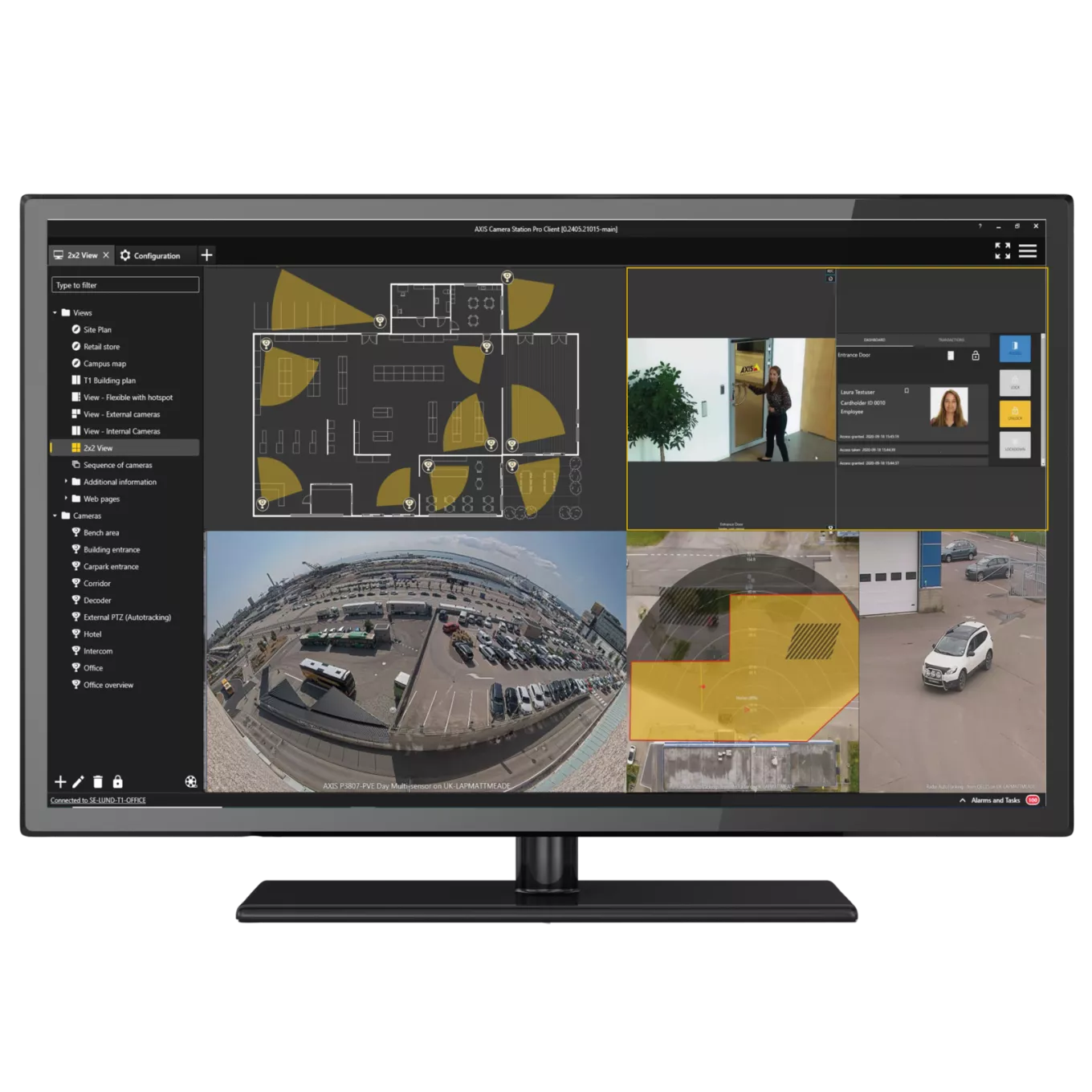
I have been skeptical of Axis Camera Station for years, without saying so loudly. Not because the product was bad, but because Axis spent the better part of a decade trying to position it as a “good enough” VMS for small-to-medium deployments while letting Genetec, Milestone, and Avigilon own the enterprise conversation. ACS was the camera-vendor’s afterthought. It worked. Nobody got excited about it.
That changed somewhere between version 6.1 (when Axis Camera Station Pro split from the original ACS lineage) and the current 6.14 release. The product I am evaluating today is fundamentally different from the one I dismissed in 2020. The AI, analytics, and search story is finally cohesive. In an Axis-heavy environment, nothing else integrates this tightly. And for the first time, I am seeing deployments where ACS Pro is the right answer rather than a compromise.
This is the field review for anyone running, considering, or designing around ACS Pro in 2026.
Where the version stands today
AXIS Camera Station Pro 6.14 is the current release as of mid-2026. The platform has been moving fast: 6.6 (free text search), 6.9 (swaying object filter, Secure Entry mass credential distribution), 6.10 (security fixes), 6.11 (License Plate Verifier integration), 6.12 (Audio Manager Pro), 6.13 (Badge templates and elevator access control, both in beta), 6.14 (object detection recording, multi-rule editing, vehicle make/model search).
That is 8 releases in the past 18-ish months. Aggressive cadence for a VMS, slower than ACS SaaS but appropriate for a server-based platform. The release notes are public, the upgrade paths are clean, and unlike some vendors I could name, Axis publishes a clear “What’s new” page that does not require a partner login to read.
Smart Search 2: the feature that changes the conversation
This is the headline. Smart Search 2 is Axis’s AI-powered search engine, and it is the feature that takes ACS Pro from “competent VMS” to “platform I would actually deploy for investigation-heavy environments.”
What it does, in plain terms: it indexes object metadata from every camera that supports analytics, classifies the objects it sees (people, vehicles, specific characteristics), and lets you search recorded footage by describing what you want to find.
Two search modes:
Pre-classified object filtering. Pick “person” or “vehicle” from a filter list, refine by attributes like clothing colour, vehicle colour, vehicle type, time range, and area. This is the kind of search that previously required either expensive third-party analytics (BriefCam, Veesion) or hours of manual scrubbing. ACS Pro now does it natively, with the metadata generated on-camera by AXIS Object Analytics or ARTPEC-driven deep-learning analytics.
Free text search. Type a natural-language description of what you are looking for, in English, and the system returns matching clips. “Construction worker in yellow vest near the loading dock between 2 and 4 PM” is a valid query. The model handles object recognition, attribute matching, and association reasoning (the construction-worker classification is handled by inference; you do not have to spell out every visual element).
This arrived in version 6.6 and has been refined in every subsequent release without much fanfare. By 6.14, the search results are fast, the false-positive rate is reasonable, and the workflow is actually useful for the kind of investigative work that used to eat investigator hours by the dozen.
My thought: this is the first VMS-native AI search I have used that I would actually rely on for a real investigation. The competitors are catching up, but Axis got there first on a tightly-integrated product, and it shows.
The technical caveats:
- Smart Search 2 indexes metadata from cameras with AXIS Object Analytics or supported deep-learning analytics. Older cameras without these capabilities will not contribute searchable metadata, which means your fleet’s classification coverage is a function of which cameras are deployed where.
- The 6.9 release added a swaying-object filter that strips foliage and similar repetitive motion from the indexing pipeline. This was a major precision improvement. If you are on a pre-6.9 release and seeing too many false hits from windy trees, that is why.
- ARTPEC-8 and later cameras get the best metadata fidelity. ARTPEC-9 (the Q1728, Q1726-LE, Q6355-LE, Q6358-LE, and the growing list of new models) brings improved object classification accuracy on top of AV1 codec support.
- Free text search runs locally on the server (or in Axis’s cloud if you are using the cloud variant). Either way, the prompt and the indexed metadata do not leave your environment when running on-premises, which matters for compliance-driven deployments.
AXIS Object Analytics: the engine behind the search
Smart Search 2 is the interface. AXIS Object Analytics (AOA) is the engine. AOA is the deep-learning analytics application that ships pre-installed on compatible Axis cameras and produces the object classifications that Smart Search 2 indexes.
In 6.14, AOA gained a direct role in recording configuration: the new object-detection recording method lets you trigger camera recording on human or vehicle detection rather than generic motion. This is a bigger deal than it sounds. Motion-triggered recording on a wind-prone exterior site can fill an archive with hours of swaying-branch clips. Object-triggered recording filters out anything that is not a person or vehicle, which means your archive is full of the events that actually matter rather than noise.
For storage-constrained deployments, this changes the math on retention. A camera that previously needed 90 days of motion recording to cover an investigative window can often run 90 days of object-triggered recording on a fraction of the storage, because the periods of no humans or vehicles in scene are not recorded at all.
The combination of AOA-driven recording, Smart Search 2 indexing, and ARTPEC-9 codec efficiency is starting to deliver real storage and retrieval improvements end-to-end.
My thought: this is where Axis’s “edge analytics first” architecture finally pays off. They have been pushing analytics to the camera for years; in 6.14, the VMS-side workflow finally takes full advantage of it.
AXIS Data Insights Dashboard
The Data Insights Dashboard is Axis’s visualisation layer for analytics data. Originally launched in 6.1 with crossline counting and occupancy, it expanded significantly in 6.6 with three new dashboard types:
- Audio analytics for AXIS Audio Analytics events (gunshot detection, aggression detection, glass break).
- Generic for all supported data sources including AXIS Guard Suite events and third-party analytics applications.
- Image health for AXIS Image Health Analytics, which monitors camera focus, tampering, and image quality issues.
In 6.5, vehicle data was added as a search/filter option (white bus, red sedan, license plate ranges). In 6.3, vehicle properties like colour, direction of travel, and country plate origin became searchable. By 6.14, vehicle make and model joined the list, which closes the loop on a workflow that used to require BriefCam-tier add-ons.
The dashboard is useful in three real-world scenarios I have seen:
- Retail and venue operations: occupancy trends, queue analysis, peak-hour identification.
- Industrial and warehouse: vehicle traffic patterns at loading docks, dwell-time analysis, identification of unusual stoppages.
- Healthcare and behavioural environments: aggression detection trends, dwell times in restricted areas, audio-event clustering by time of day.
For environments where the security operation also feeds operational intelligence (which is most modern deployments), the Data Insights Dashboard is a real selling point. It is not as deep as a dedicated BI platform, but it is deep enough that operators get useful answers without leaving the VMS.
AXIS License Plate Verifier
ALPR has matured significantly in the past few releases. License Plate Verifier got serious integration improvements in 6.11, where the workflow for managing authorised plate lists, syncing groups of cameras, and triggering barrier control became operator-friendly. 6.14 expanded the search side: data search now supports vehicle make and model in addition to plate, colour, direction, and country.
For sites that need vehicle access control (gated communities, corporate parking, secure logistics yards, employee parking enforcement), the ACS Pro + License Plate Verifier combination is becoming a credible alternative to specialised ALPR products. It runs on the Axis cameras you have already got (or new Axis cameras you would buy anyway), no separate licensing dance, no third-party analytics server.
The caveat: License Plate Verifier capabilities depend on the camera. License Plate Verifier kit cameras with OS 12.8 or the License Plate Verifier version 3 ACAP on standalone cameras give you the full feature set. Older kit cameras get baseline ALPR but not the latest searchable attributes.
Axis Secure Entry: the access control side
For sites running ACS Pro as the unified VMS plus access control platform, Secure Entry has matured into a real Mercury-class alternative on Axis hardware. The 6.5 release brought Secure Entry 2.0 UI improvements and roll-call/mustering reports (relevant for healthcare, education, and large industrial sites). 6.9 added mass distribution of QR and mobile credentials, which closes a workflow gap that previously required either manual per-cardholder emails or external bulk-email tooling.
The 6.13 release added elevator access control in beta, with a new “Floor” door type, support for up to 16 floors, and the AXIS A9910 Relay Expansion Module for sites needing more floor relays. Beta status is real (you should test thoroughly before deploying to production), but the feature exists and the foundation is in place.
The trade-off versus Mercury or HID-on-Synergis: Axis Secure Entry is a tightly integrated, Axis-only access control stack. The Axis A1610, A1710, and A1810 door controllers handle the controller layer; the AXIS A4612 Bluetooth Reader and equivalent readers handle the credential layer. For all-Axis deployments, the integration is tight and the management surface is minimal. For mixed-vendor deployments, this is not the answer; you will still want Synergis with Mercury or HID hardware, or an Avigilon Alta stack, depending on your environment.
What is worth using, what is worth waiting on
Going feature by feature, my current field guidance:
Use today:
- Smart Search 2 (free text and object filtering). Mature, fast, valuable.
- AXIS Object Analytics + object-detection recording. Real storage and clarity wins.
- AXIS Data Insights Dashboard. Useful for any environment with operational reporting needs.
- AXIS License Plate Verifier with vehicle make/model search.
- Secure Entry 2.0 (the GA, non-beta features). Solid for Axis-only access control.
- AV1 codec support (with ARTPEC-9 cameras only, AXIS OS 12+).
- Axis Secure Remote Access v2 (the legacy v1 was deprecated in late 2025, plan accordingly).
Test before deploying:
- Elevator access control (beta in 6.13/6.14). Functional but flag the beta status with the client.
- Badge templates and printing (beta in 6.13). Useful when it works, but production deployments need careful testing.
- Multi-server distributed search. Works, but federated environments deserve a test pass.
Mind the gap:
- Mobile app feature parity. The mobile app has been steadily improving (access control in 6.8, expanded views over time), but parity with desktop is still partial. For operators who will work primarily from a phone, test the workflows that matter to your team specifically.
- Smart Search 2 results depend on metadata coverage from your camera fleet. Older or non-Axis cameras do not contribute metadata. Plan deployments around this rather than discovering it after the fact.
Architectural notes:
- ACS Pro is a Windows server platform, like Genetec on-prem. No Linux option. If your IT standardised on Linux for infrastructure, that is the conversation to have early.
- Cloud connectivity is available via Axis Cloud Connect for license management, server monitoring, web client access, and similar functions. The cloud variant of Smart Search 2 (added in 6.5) extends the search workflow to remote operators via My Systems.
How ACS Pro stacks against Genetec
The honest comparison: they are different products solving overlapping problems.
ACS Pro wins on:
- Axis-native deployments (camera, intercom, audio, access control on Axis hardware). The integration is tighter than any third-party VMS managing Axis gear.
- Smart Search 2 free text search. Genetec is catching up via Security Center SaaS features, but on-prem parity is not there yet.
- Out-of-the-box analytics for any environment running Axis ARTPEC-8 or 9 cameras.
- Total cost of ownership for small-to-medium Axis-heavy sites. ACS Pro perpetual licensing avoids per-channel surprises.
Genetec wins on:
- Multi-vendor camera environments. Genetec’s driver pack covers more cameras with more features than ACS Pro is targeted to.
- Enterprise-scale federated systems and multi-site management. Genetec’s federation model is more mature.
- Integration depth with non-Axis access control (Mercury, HID Aero, ASSA ABLOY Aperio, building automation).
- Mission Control and Operations Center for command-and-control workflows.
- Customisable SDK and a deeper third-party integration network.
The decision rule I am using for clients: if the site is predominantly Axis hardware and the use case is straightforward video plus access control, ACS Pro deserves the consideration. If the site is mixed-vendor or runs at enterprise scale with federation requirements, Genetec stays the default.
My thought: nobody benefits from a religious war between VMS platforms. The right answer depends on the deployment. ACS Pro has earned a seat at the table in 2026 in a way it had not in 2022.
Where I land on this one
- ACS Pro in 2026 is a fundamentally different product than the one I dismissed in 2020. The trajectory since 6.1 is genuine, not marketing.
- Smart Search 2 (free text + object filtering) is the feature that made me change my mind. First VMS-native AI search I would actually rely on for a real investigation.
- AXIS Object Analytics + object-detection recording changes the storage math for any deployment with long retention requirements. Real savings, not benchmark numbers.
- For Axis-heavy deployments where the use case is video plus access control, ACS Pro earns a seat on the shortlist. Sometimes it wins the seat.
- For mixed-vendor environments or enterprise-scale federated systems, Genetec still owns the conversation. ACS Pro is not trying to be that product.
- The beta features (elevator access control, badge templates) need to come out of beta before I would put them in a client SOW. Test them, but do not lean on them yet.
- Mobile app parity, multi-vendor depth, and a Linux server option remain open items. Watch the cadence; Axis is moving faster than most VMS vendors.
Whichever VMS you land on, the network underneath it decides whether it performs. See building a network for CCTV and access control for the infrastructure side, and the security system hardening guide for hardening it.